NetSim + Gen AI
NetSim + Generative AI
Last updated: Oct 2026
NetSim + Gen AI brings generative-AI coding agents into network simulation. Researchers move from idea to validated result in much less time. Pair the full-source NetSim 5G/6G simulator with an AI coding agent to build, run and calibrate digital twins from the command line.
Gen AI adds an agentic coding layer over the full NetSim source code. It automates model development for 5G/6G, satellite, MANET/VANET, IoT, LTE and Wi-Fi networks. Work that took weeks now takes hours.
Four pillars of the platform
Generative AI coding agents take network simulation from idea to validated result in much less time.
AI-driven simulation
Autonomous agents configure, launch and refine network scenarios end to end, with no manual scripting.
Digital twin modeling
Build a live mirror of your network and calibrate it against real-world measurement data.
CLI automation
Translate plain-English intent into executable simulation steps from the command line.
Performance analytics
Throughput, latency and KPI dashboards refresh on each iteration of the loop.
How it works: coding agents and the LLM loop
An AI coding agent reads, writes, builds and runs code directly inside NetSim. It edits, runs, inspects and adjusts, as you would.
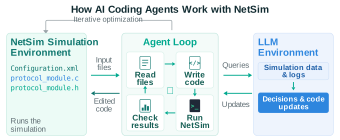
- Read files: ingest the XML config and source code.
- Write code: the agent edits the protocol modules.
- Run NetSim: compile the DLL and run the simulation.
- Check results: evaluate KPIs, then iterate until optimised.
Configuration.netsim, protocol source (.c / .h)
Metrics.xml, CSV logs and KPI analysis
A complete AI-native simulation toolkit
The product includes all that the agent needs to develop, run and validate models.
AI-driven simulation and automation
AI agents set up, run and refine network scenarios in iterations, with minimal human input.
Source code included
The full protocol source code ships with the product, so you can customise all of it.
Python interface for AI/ML
Native Python hooks connect simulations to your AI/ML training and inference workflows.
Digital twin calibration
Tune the digital twin continuously against real-world measurement data.
Natural-language CLI automation
Give instructions in plain English. The agent runs the correct commands for you.
Also includes
- Drag-and-drop GUI and XML design
- Packet and event animation
- Python, MATLAB, SUMO, Wireshark
- Results dashboard and KPI analytics
- Source C code and online debugging
- Batch CLI runs and parameter sweeps
Why teams choose it
The agent edits real source code and runs real simulations. Nothing is a black box.
- Turns weeks of edit/build/run cycles into hours of autonomous iteration.
- Edits the NetSim C source directly in PHY, MAC, RLC and scheduling.
- Logs each config, build and result, so experiments are reproducible and auditable.
- Calibrates digital twins against 3GPP references and field measurements.
- Runs batch CLI sweeps over parameters, protocols and seeds, and parses the results automatically.
Works with every NetSim protocol
The agent edits the NetSim source directly in all technology libraries.
Bring your own AI agent
NetSim works with any coding agent. Drive NetSim from the coding agent that your team already uses.
Works with the agents you know
NetSim exposes its source, build system, CLI and outputs as plain files and commands, so any capable coding agent can drive it.
Get started in four steps
- Install your agentFor example,
npm install -g codex. - Open the workspace
cd NetSim-work\v15.0 - Add AGENTS.mdPoint it at your paths, configs, and CLI.
- Prepare the first run
set NETSIM_AUTO=1
Request a demo and evaluation
See NetSim + Gen AI on your project. With full source access, CLI simulation and AI-driven digital twin calibration, months of 5G/6G development can take hours.