
NetSim Network Emulator
Last updated: Oct 2026
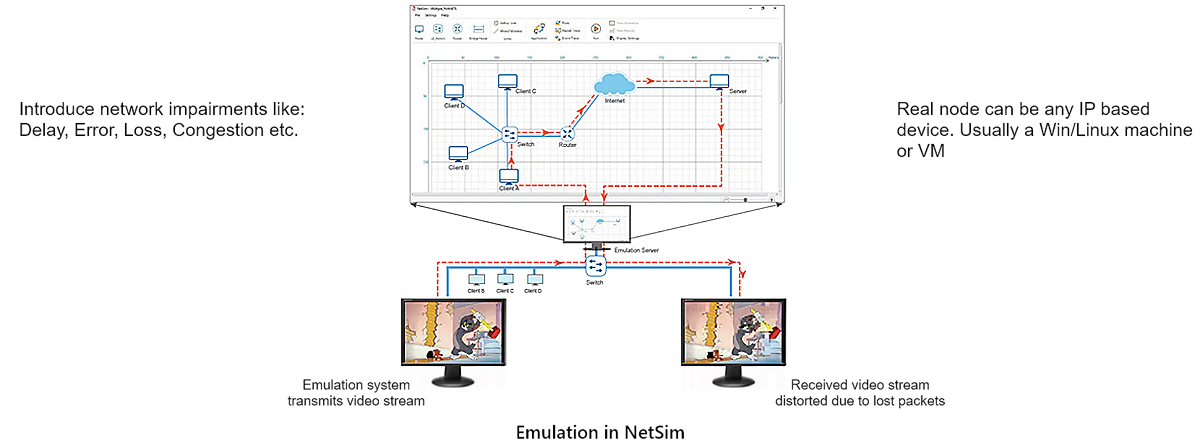
NetSim Network Emulator connects the simulator to real hardware that runs live applications such as video, voice, file transfer and email. This method is also called System-in-the-Loop (SITL). Physical hardware and a simulation operate as a single system. Real traffic flows through a virtual network, which applies the delay, loss and error that you configure. You see the effect directly on the live application.
It costs less than hardware emulators and full physical test labs, which have high cost, complicated configuration and limited scale. Build a network of up to a few hundred virtual nodes on a single PC, and map them to any number of real devices.
Real, simulated, real
A real PC running the NetSim Emulation Client sends live traffic to the PC running the NetSim Emulation Server. The simulation runs in sync with the wall clock. It acts as a transit network that applies simulated network effects to the datagrams.
- A real packet arrives at the emulation server interface.
- NetSim converts it into a simulation packet at ingress.
- It crosses the virtual network, which adds delay, loss and error.
- At egress, NetSim converts it back and re-injects it to the real destination.
Why use the emulator
Test real software and hardware against network conditions you control.
Application performance
Before deployment, measure how real applications behave with network effects such as error, delay and loss.
Impact you can see
You see the effect immediately on the live video, voice or transfer. You do not need to interpret it from simulation statistics.
Protocol R&D
Develop new protocols and test their performance with real applications instead of synthetic load generators.
Design-stage testing
Validate a design before the real devices or software are ready. Emulate the network that they will run over.
Cyber test beds
Integrate into cyber ranges and test beds to study how attacks and defences behave over a realistic transit network.
No expensive lab
Replace racks of hardware impairment boxes with one PC. Scale to topologies that are impractical to build physically.
Connect real applications and devices
NetSim is an IP-based, data-plane, flow-through emulator. You can drive any IP application through it.
Live video
Stream an RTP / MPEG transport stream from VLC and watch the quality change as the virtual network adds loss and jitter.
Voice calls
Place a two-way Skype or VoIP call between real systems and study call quality under controlled delay and jitter.
File transfer
Move files with FileZilla over FTP. Compare the transfer speed with and without the emulated link constraints.
Throughput tests
Run JPerf or iPerf, and see the goodput drop to the virtual link capacity, for example 120 Kbps over a constrained radio link.
Databases
Send PostgreSQL / pgAdmin queries across the emulator. Time the response as network conditions change between runs.
GIS and map servers
Drive a GeoServer map client through the emulator and measure how the map load time responds to the transit network.
Example use cases
Run real applications over a modelled link, from tactical radios to enterprise WANs.
Military radios (MANET)
- Soldiers communicate as a Mobile Ad-hoc Network using UHF / VHF radios modelled in the NetSim emulation server.
- Each soldier is a virtual machine on a physical server. The MANET models mobility, RF propagation and L3 / MAC / PHY attributes.
- Real-time data, voice, or video flows between the VMs, soldier to soldier.
- Change a parameter such as PHY rate, then watch the real iPerf throughput follow the new link capacity. Measure loss, delay, error, throughput and quality of service.
5G networks
- A typical 5G network: cameras upload video, and phones (UEs) upload and download files.
- Change network parameters such as bandwidth, pathloss, transmit power, antenna count and mobility.
- Run what-if scenarios: change the file transfer and video rates.
- Study application performance, and analyse loss, delay, error, throughput and quality of service.
WAN application testing
- Model a branch to data centre WAN with the bandwidth, latency and queuing of the real circuit.
- Run the application your users run: file transfer, database queries, video conferencing, or a web client.
- Change the circuit speed, add congestion from other sites, or take a link down, and watch the effect on the application.
- Record response time and throughput on each run. Compare circuit designs before you commit to the bandwidth.
Satellite and NTN links
- Run real applications over a LEO, MEO, or GEO link, with the propagation delay and path loss of the orbit you choose.
- Satellites move on their orbits, so the link budget, the delay and the visibility window change during the pass.
- Change the constellation, altitude, or beam layout, and repeat the same application test against each design.
- See how a long round trip affects file transfer, video and interactive sessions. Measure loss, delay, throughput and quality of service.
Configuration and measurement
Choose which traffic enters the simulation, then capture each packet for analysis.
Traffic filtering
Map real flows into the simulation by source and destination IP and port. Use 0.0.0.0 as a wildcard to admit all matching traffic.
Device or application scope
Device-specific emulation maps all traffic between two hosts. Application-specific emulation limits it to a single port pair.
PCAP capture
Wireshark-compatible logs record all network packets: packets dispatched to the emulator, packets re-injected, and packets not dispatched.
Jitter control
Add jitter with Poisson background traffic. More background packets cause a larger delay variance in the competing flow.
PCAP file input
Replay a recorded pcap file into the emulator. Map its real source and destination addresses onto the virtual topology.
Round-trip delay
Two-way applications such as ping need a forward and a reverse emulation application. Then both the request and the reply cross the virtual network.
Scheduled outages
Fail a link at a chosen time and bring it back, or degrade it while the session runs. The application stays live, so you see how it behaves during the outage and how quickly it recovers.
Features and specifications
This section describes the emulator design, setup and limits.
Flow-through, data plane
The emulator is IP-based, data-plane and flow-through. It sends actual data between clients and servers through a virtual network. It models the data plane, not the control plane.
Three-system lab
One system runs NetSim on Windows 10 or 11. An L2 switch connects it to the servers or PCs that run your applications, and the NetSim system is their gateway.
Convert and re-inject
At ingress, NetSim converts real packets to virtual NetSim packets. It applies the configured delay, loss and error, then converts them back to real packets at egress.
Both ends real or virtual
Source and destination must both be in the real world or both virtual. A virtual node cannot be the sink for real traffic, and vice versa.
Generic devices, COTS
The emulator models generic network devices, not vendor-specific equipment, and offers socket-based connectivity. This describes the COTS build. Custom development can extend it.
Source code in C
NetSim ships with protocol source code in C. Modify the stack, and develop custom protocols, waveforms and conversion logic for requirements beyond the standard build.
Frequently asked questions
These are short answers to the questions that test teams ask most often.
How do I set a specific packet loss rate?
You set loss through the bit error rate on the link. The resulting packet loss depends on your packet size. Tell us the loss percentage and the packet size you are testing at, and we will give you the value to enter.
How do I control jitter?
Add background traffic with an exponential inter-arrival time so that it shares a link with your flow. Raising its rate raises the delay variance your application sees. A lightly loaded path gives near-constant delay, so the same scenario also serves low-jitter testing.
Can I emulate packet duplication?
Yes, by pairing NetSim with a host-side tool. On Linux, the standard netem facility duplicates a set percentage of packets on the sending machine. On Windows, the free tool clumsy does the same, with a duplication chance and a copy count. Duplicates from the sender still travel the emulated path, so each copy gets its own delay and can be lost independently. NetSim supplies the delay, bandwidth, loss and congestion, and the host tool supplies the duplication.
How many machines do I need?
Three: the real source, the machine running NetSim, and the real destination. Virtual machines and containers work in place of physical hosts.
Put your hardware in the loop
See your real applications and devices run over a network you control. Request an evaluation, or talk to us about a custom emulation set-up for your test bed.